

![Norton 360 Premium 2025, Antivirus Software for 10 Devices – With VPN, Dark Web Monitoring & PC Cloud Backup [Download]](http://softwarediscountusa.com/cdn/shop/files/norton-premium-360_10dev_1yr_new.jpg?v=1757398280&width=679)

- Digital download
- 1 Year License
- For PC
- Fast and Secure Email Delivery
- Lifetime Support / Live Chat Support
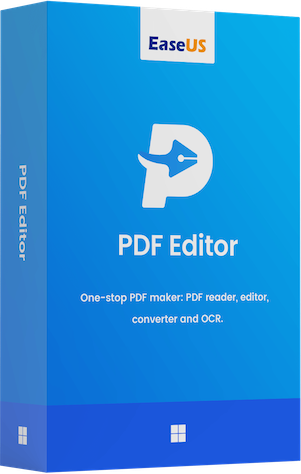
EaseUS PDF Editor
Digital download, no hard copy will be shipped.
WORKS ON
EaseUS PDF Editor – Your Complete PDF Editing, Creation & Conversion Solution
Upgrade your workflow with EaseUS PDF Editor, the all-in-one PDF software designed for effortless editing, seamless conversions, and professional document management. Perfect for businesses, students, and everyday users, this powerful tool gives you everything you need to take full control of your PDF files with ease.
With its intuitive, user-friendly interface, you can quickly add, delete, or edit text and images, rearrange pages, and customize documents to fit your exact needs. Built-in annotation, highlighting, and commenting features make collaboration simple and efficient—ideal for teams and remote work environments.
Need to convert a PDF? EaseUS PDF Editor delivers high-accuracy conversions to Word, Excel, PowerPoint, and more, saving you time and ensuring your formatting stays intact. Whether you’re updating reports, preparing presentations, or creating new documents from scratch, this versatile software keeps your workflow smooth and efficient.

Why Choose EaseUS PDF Editor?
- Easy, intuitive PDF editing for all skill levels
- Fast, accurate PDF-to-Word, Excel, and PowerPoint conversions
- Professional annotation and collaboration tools
- Reliable document creation and customization
- A complete solution for business, school, and personal use
Other EaseUS PDF Feature
- Search & Replace. Quickly find and replace specified text in your PDF document.
- Change Background. Set any image or color as a background or remove the background from PDF.
- Bates Numbering. Add Bates numbers to multiple PDFs for easy identification and retrieval.
- Read PDF. View your PDF files with many reading options, like rotating, zooming, etc.
Key features of EaseUS PDF Editor
All-in-One PDF Maker, Reader, Editor and Converter
- Convert PDF files to Excel, Word, PowerPoint, images or vice versa
- Edit, OCR, merge, split, compress, create and annotate your PDFs
- Sign, print, encrypt, remove password and add watermark to PDF


Convert PDF to Word, Image and More in No Time
- PDFs are trusted for their consistent, reliable formatting—no matter which device or platform you use. With EaseUS PDF Editor, you can instantly create high-quality PDFs from scratch or convert images, Office documents, and other popular file types into PDF while maintaining original fonts, images, and layouts perfectly intact. Enjoy effortless PDF creation with professional results every time.
- Need your PDF in another format? EaseUS PDF Editor delivers fast, accurate conversions to all the most common formats, including DOC, DOCX, XLS, XLSX, PPT, PPTX, PNG, BMP, TIFF, JPG, and JPEG. Preserve your original text, images, and formatting with industry-leading precision—perfect for reports, presentations, spreadsheets, and everyday document tasks.
- Editing scanned documents has never been easier. Powered by advanced OCR (Optical Character Recognition) technology, EaseUS PDF Editor transforms image-based PDFs into editable, searchable documents with exceptional accuracy. It supports 29 languages, including English, French, German, Italian, Korean, and Japanese—making global document editing fast, seamless, and incredibly efficient.
Create or Edit PDF as You Like
- PDFs are traditionally difficult to edit—but not with EaseUS PDF Editor. Enjoy complete control as you add, modify, or delete text, images, and links effortlessly. Manage your pages like a pro: insert, remove, reorder, extract, crop, rotate, or even adjust PDF page size in seconds. You can also instantly add headers, footers, and page numbers to give your documents a clean, professional finish.
- Make teamwork smoother than ever with powerful PDF collaboration tools. Highlight key information using comments, arrows, boxes, lines, and markup tools, ensuring everyone stays aligned. Create bookmarks for quick navigation and easily share your PDF files via email—all directly from the editor. Perfect for teams, remote workflows, and fast-paced productivity.
- Build professional, fillable PDF forms with zero hassle. EaseUS PDF Editor includes six interactive form controls—push buttons, check boxes, radio buttons, combo boxes, list boxes, and text fields—giving you everything you need to design custom forms for surveys, questionnaires, applications, and more. Save time with built-in options to import or export form data, allowing you to complete multiple forms with a single click.

Manage and Secure PDF Files with Ease
- Merge
- Compress
- Split
- Sign
- Protect
- Add Watermark
The Best PDF Editor Perfect for Any Industry
- Manufacturing
- Real Estate
- Education and learning
- Financial Industry
- Legal
- Professional Services