


Is Windows Defender Enough in 2026? When to Add Antivirus or a VPN
Short version: Microsoft Defender is real antivirus, and for a careful single-PC user it covers the basics. Most households need more than that.
Defender doesn't cover your phones, it doesn't encrypt your traffic on public Wi-Fi, and it doesn't back up your files or watch for your passwords on the dark web. Here's how to tell whether you need a paid suite, and which kind.
Is Windows Defender Enough? The Short Answer
Yes for basic protection on one carefully used Windows PC. No if you need to protect phones and Macs, use public Wi-Fi, or want backup and identity alerts. That's also the honest answer to "what's the best antivirus for Windows 11?": for many people it's Defender plus good habits, and for most families it's a multi-device suite. The rest of this guide helps you tell which one you are.
What Windows Defender Already Does
Every Windows 10 and Windows 11 PC comes with Microsoft Defender Antivirus built in through the Windows Security app. It scans files in real time, blocks known malware, updates itself through Windows Update, and includes a firewall and ransomware protection settings. You don't have to install anything to get it.
Independent labs such as AV-TEST test Defender alongside paid products every couple of months, and it's worth checking their latest results before you decide.
What Defender Doesn't Cover
- Your other devices. Defender protects that one Windows PC. It doesn't cover a Mac, Android phone, iPhone or tablet in the same household.
- Public Wi-Fi. It doesn't include a VPN, so traffic on hotel, airport or coffee-shop Wi-Fi isn't encrypted.
- Backup. If ransomware or a dead drive takes your files, Defender doesn't keep a copy somewhere else.
- Identity and scam alerts. It doesn't watch the dark web for your email or passwords, and it isn't built to spot scam texts on your phone.
- One dashboard for the family. There's no single place to see every device's protection status.
Is Defender Enough for You?
| Your situation | Defender alone? | What to add |
|---|---|---|
| One Windows PC, careful with email and downloads, home Wi-Fi only | Usually yes | Nothing required. Keep Windows updated. |
| Family with PCs, Macs and phones | No | A multi-device suite like Bitdefender Family Pack or McAfee LiveSafe |
| You work on laptops away from home | No | A VPN such as NordVPN or a suite that includes one, like Norton 360 Premium |
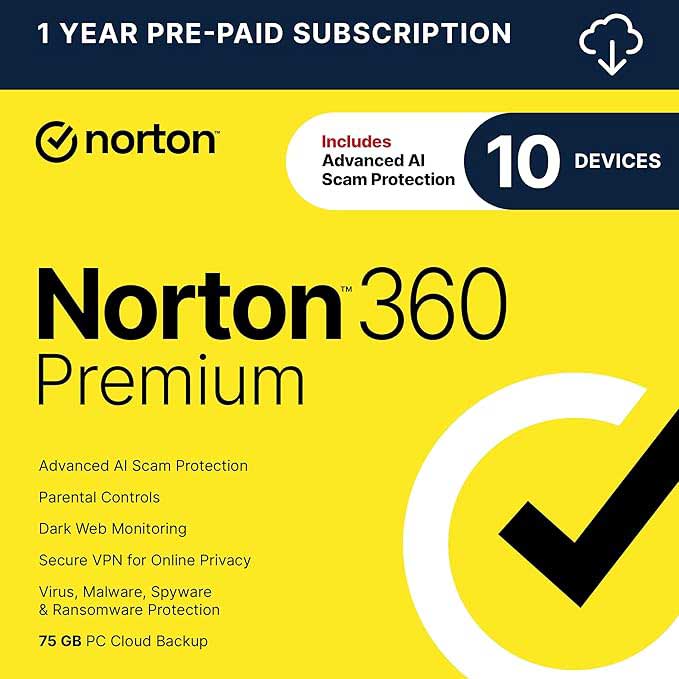
| You want backup and dark web monitoring in one place | No | Norton 360 Premium (VPN, dark web monitoring, PC cloud backup, 10 devices) |
| You use a Mac | Defender is Windows only | Bitdefender Antivirus for Mac |
| You think something already got in | Get a second opinion | Malwarebytes Premium scan |
Antivirus vs VPN: They Do Different Jobs
This is the part people mix up. Antivirus stops bad files and websites from harming your device. A VPN encrypts the connection between your device and the internet, so the network you're on (and whoever runs it) can't see what you're doing. If you only buy one, buy the one that matches your risk: lots of devices and downloads means a security suite; lots of travel and public Wi-Fi means a VPN. Some suites include both.
Compare antivirus and VPN options →
Norton vs McAfee vs Bitdefender: Which to Pick
- Norton 360 bundles antivirus with a VPN, dark web monitoring and PC cloud backup. Good if you want one subscription that does most things.
- Bitdefender has single-PC plans up to a 15-device Family Pack covering Windows, Mac, Android and iOS. Good for mixed-device households.
- McAfee LiveSafe covers an unlimited number of your devices on one plan.
- Malwarebytes Premium is popular for cleaning up a PC that already has a problem, and it can be set to run alongside Defender as a second layer.
- NordVPN is a dedicated VPN for up to 10 devices, with higher plans adding extra security tools.
Quick tie-breakers. In Norton vs McAfee, Norton 360 Premium adds PC cloud backup and McAfee LiveSafe covers unlimited devices, so pick by whether backup or device count matters more to you. In Bitdefender vs Norton, Bitdefender's Family Pack covers 15 devices across Windows, Mac, Android and iOS, while Norton 360 Premium covers 10 devices and adds backup. For a deeper head-to-head, see McAfee vs Bitdefender.
One rule either way
Don't run two full antivirus programs at once. When you install Norton, Bitdefender or McAfee, Windows turns Defender's real-time scanning off automatically. If you want Malwarebytes as a second layer, turn off its "Register Malwarebytes in Windows Security Center" setting so it runs next to Defender instead of replacing it.
Frequently Asked Questions
Is Windows Defender good enough in 2026?
For one carefully used Windows PC, Microsoft Defender covers basic antivirus protection. It doesn't cover other devices, public Wi-Fi, backup or identity monitoring, which is where paid suites add value.
Do I need antivirus on Windows 11?
Windows 11 includes Microsoft Defender Antivirus. You don't need to buy one, but many households add a suite for multi-device coverage, a VPN, backup or dark web monitoring.
Can I use Norton or Bitdefender with Windows Defender?
You don't need both. When you install a full antivirus suite, Windows switches Defender's real-time protection off so the two don't conflict.
Is a VPN the same as antivirus?
No. Antivirus protects your device from malicious files and sites. A VPN encrypts your internet connection, which matters most on public Wi-Fi.
What is the best antivirus for Windows 11?
Windows 11 already includes Microsoft Defender, which covers basic protection on a single careful PC. If you want coverage for phones and Macs, a VPN, or backup, a suite like Norton 360, Bitdefender or McAfee is the better fit.
Norton vs McAfee: which should I get?
Both are full security suites. Norton 360 Premium covers 10 devices and adds a VPN, dark web monitoring and PC cloud backup. McAfee LiveSafe covers unlimited devices on one plan. Pick Norton for backup and extras, McAfee if you have lots of devices.
What's the best antivirus for a family with phones and Macs?
Look for a multi-device plan, such as Bitdefender Family Pack (15 devices) or McAfee LiveSafe (unlimited devices), that covers Windows, Mac, Android and iOS.
Sources
- Microsoft: Stay protected with the Windows Security app
- Microsoft: Microsoft Defender Antivirus compatibility with other security products
- AV-TEST: Antivirus test results for Windows home users
Last reviewed October 10, 2026.