


Description
Microsoft Exchange Server 365 Plan 1
Secure and reliable business-class email with a 50 GB mailbox per user. It is a viable option for businesses that prefer to have their email operations in the cloud rather than on premises.
50 GB of mailbox storage
Each user gets 50 GB of mailbox storage and can send messages up to 150 MB in size.
____________________
Microsoft-hosted cloud service
Microsoft Exchange provides the capabilities of Exchange Server as a Microsoft-hosted cloud service. The subscription-based nature of Exchange Online allows you to enjoy the benefits of business-class email in a pay-as-you-go model.
One-Month subscription
This one-month subscription is for Plan 1 of Microsoft Exchange Online.
____________________
50 GB of mailbox storage
Messages up to 150 MB in size
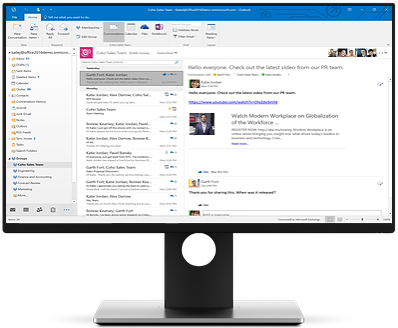
Connections to Outlook
Web-based access
Inbox management
Focused inbox
Your inbox includes two tabs:
- Focused for email you need to act on right now
- Other for everything else
You can switch the tabs at any time and always see email flowing into Other
Calendars and contacts
Compare calendars to schedule meetings and access collaboration features, including
____________________
Shared calendars
The global address list
External contacts
Tasks
Conference rooms
Delegation capabilities
Security and reliability
Exchange Online helps protect your information with advanced capabilities.
____________________
Data loss prevention
Data loss prevention capabilities prevent users from mistakenly sending sensitive information to unauthorized people.
Anti-malware and anti-spam
_____
Every mailbox is protected with Exchange Online Protection, a cloud-based email filtering service that helps protect your organization against spam and malware.99.9% uptime
_____
With a guaranteed 99.9% uptime, financially-backed service level agreement, you can count on your email always being up and running.Safeguard your data
_____
Globally redundant servers, premier disaster recovery capabilities, and a team of security experts monitoring Exchange Online around the clock safeguard your data.Stay in control
Host your email on Microsoft servers
____________________
Easy-to-use web-based interface
Maintain control over your environment while gaining the advantage of hosting your email on Microsoft servers. Manage your organization efficiently with the Exchange admin center, an easy-to-use, web-based interface.
eDiscovery Center
Run In-Place eDiscovery across Exchange, SharePoint, and Skype for Business data from a single interface through the eDiscovery Center. Tooltip with information about availability of running eDiscovery from the eDiscovery Center With mobile device policies, you can:
Create approved mobile device lists
_____
Enforce PIN lock
_____
Remove confidential company data from lost phones
_____
Easy to use and maintain
It’s easier than ever to provide your users with the business email they need to stay productive.
____________________
Automatic patching
Automatic patching eliminates the time and effort of maintaining your system. Give your users an In-Place Archive, so they can keep all their important data in one place. Keep your inbox clean by automatically moving old messages to an In-Place Archive.
Anywhere access
Provide your user with anywhere access to email, calendar, and contacts on all major browsers and across devices. Users can integrate supported versions of Microsoft Outlook to Exchange Online, to be able to use the familiar and rich client interface. Exchange ActiveSync enables mobile phone users to access their email, calendar, contacts, and tasks, and to continue to access this information while they're working offline.
Web-client access
For web-client access, Outlook on the web provides a premium browser-based experience that matches the look and feel of the full Outlook client. If a mobile device is lost, stolen, or otherwise compromised, you can issue a remote wipe command from the Exchange Server computer or from any Web browser by using Outlook Web App. This command erases all data from the mobile device.
Compare Editions
Microsoft Exchange Online (Plan 1) - 1 Month Subscription
Microsoft Exchange Server 365 Plan 1 Secure and reliable business-class email with a 50 GB mailbox per user. It is a viable option for...
One-time payment
No software subscription
Not sure it’s the right fit? ask us.

